
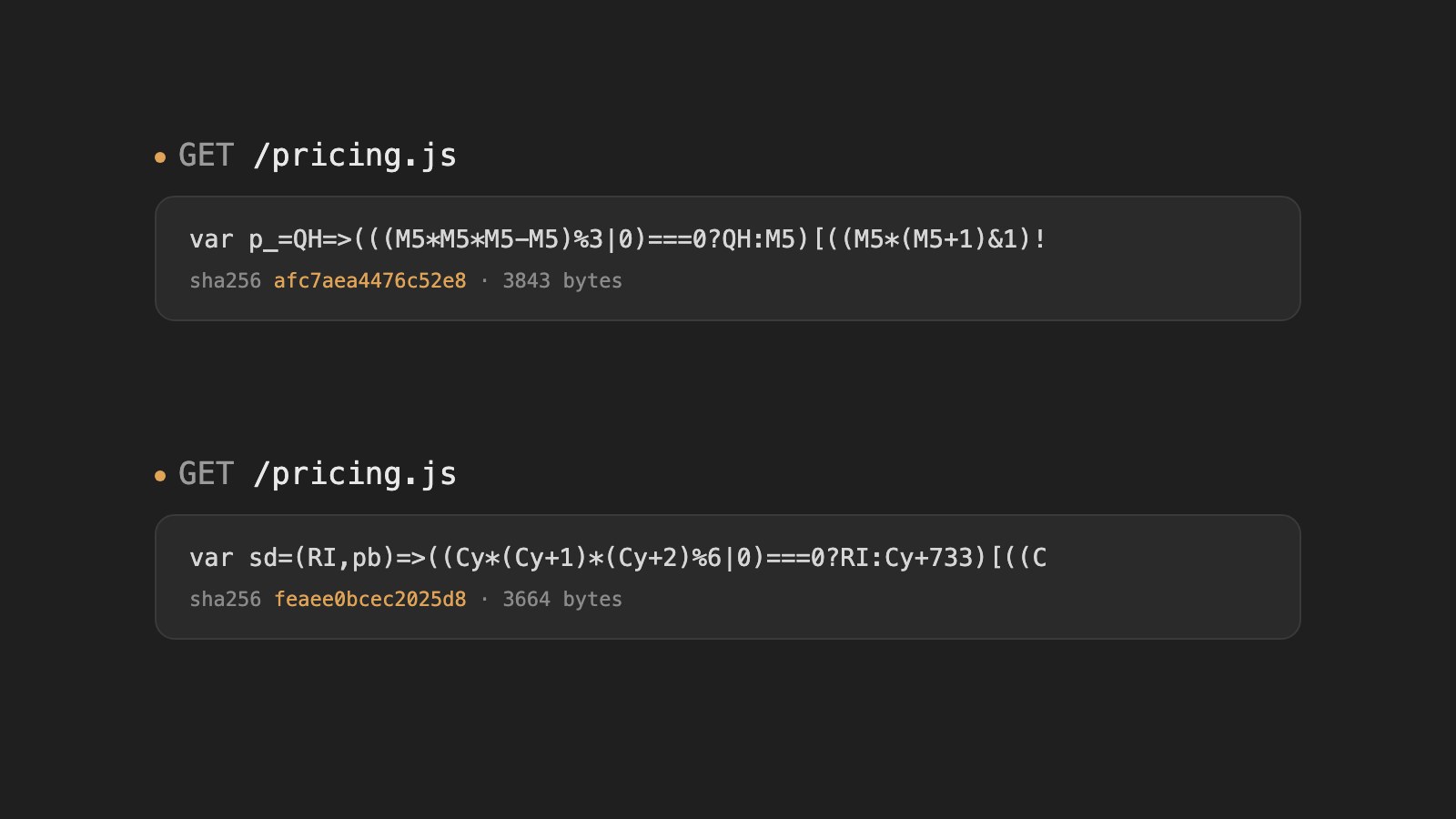
To obfuscate JavaScript on every request in a Cloudflare Worker, install @afterpack/wasm and call obfuscate() in your fetch handler with a random seed: each response is a structurally different script that behaves the same. The package is the engine of AfterPack (afterpack.dev), the JavaScript obfuscator, compiled to WebAssembly; it is free and runs inside your Worker. Real bundles exceed the free plan's 10 ms CPU cap, so use Workers Paid and cache one obfuscated version per time window.
I ran everything below with wrangler dev: the exact Worker, the curl output showing two different bodies for the same URL, and a cached variant that rotates every ten minutes instead of every request. Code obfuscation on every request takes one npm package and under twenty lines of Worker code.
AI made reading shipped JavaScript cheap: an AI agent took minutes to turn obfuscated demos back into clean source. The AfterPack CLI and framework plugins answer that per release, with a new seed on every build (launch post). Inside your own Worker, the same engine moves that cadence to every request, so anything automated against one copy of a script has to be rebuilt for the next.
What does code obfuscation on every request stop?
It stops hooks, patches and deobfuscation scripts built against one response from working on the next, because identifiers, offsets and decoder positions move every time. That matters for the scripts automation keeps coming back to: anti-bot and challenge scripts, client-side integrity checks, and scripts that scrapers patch or hook to get around them.
Each response is also a full AfterPack build: algorithms are rewritten, control flow is flattened and identities are fused, so even a reversed copy differs from the code you wrote. Every response is still the same program, though, and no obfuscator, AfterPack included, makes reversal impossible.
How to install a JavaScript obfuscator in a Cloudflare Worker
Install @afterpack/wasm next to wrangler and import obfuscate from it. There is no init call, no nodejs_compat flag and no wrangler rule for the .wasm file.
Versions I used, on 2026-09-27: @afterpack/wasm 0.1.0, wrangler 4.141.0, Node 24.21.0, on an Apple M2 Max.
| npm i @afterpack/wasm wrangler |
@afterpack/wasm is the same Rust engine the CLI and plugins run, compiled to WebAssembly; the package's exports map hands wrangler a Worker-shaped entry (docs). The same import works in Node, where a different entry reads the binary off disk, though in a normal Node build the native @afterpack/core is faster.
The demo script is a small client-side price calculator. It stands in for a challenge or integrity script, and it is short enough to check the output against by hand:
src/pricing.client.js — the source being served
| 1 | const TIERS = [ |
| 2 | { min: 1, max: 9, unit: 12 }, |
| 3 | { min: 10, max: 49, unit: 10 }, |
| 4 | { min: 50, max: Infinity, unit: 8 }, |
| 5 | ]; |
| 6 | |
| 7 | function unitPrice(quantity) { |
| 8 | const tier = TIERS.find((t) => quantity >= t.min && quantity <= t.max); |
| 9 | return tier ? tier.unit : TIERS[0].unit; |
| 10 | } |
| 11 | |
| 12 | export function quote(quantity, coupon) { |
| 13 | let total = unitPrice(quantity) * quantity; |
| 14 | if (coupon === "LAUNCH20" && quantity >= 10) total *= 0.8; |
| 15 | return Math.round(total * 100) / 100; |
| 16 | } |
The Worker imports that file as a string, which takes one wrangler rule for the source file (the engine needs none). wrangler.jsonc:
| 1 | { |
| 2 | "name": "per-request-obfuscation", |
| 3 | "main": "src/worker.js", |
| 4 | "compatibility_date": "2026-09-25", |
| 5 | "vars": { "WINDOW_SECONDS": "600" }, |
| 6 | "rules": [{ "type": "Text", "globs": ["**/*.client.js"], "fallthrough": true }] |
| 7 | } |
How to obfuscate JavaScript on every request
Draw a random seed in the fetch handler, pass it to obfuscate(), and return the result with cache-control: no-store. Every response is then built from its own seed.
src/worker.js:
| 1 | import { obfuscate } from "@afterpack/wasm"; |
| 2 | import source from "./pricing.client.js"; |
| 3 | |
| 4 | export default { |
| 5 | async fetch(request) { |
| 6 | if (new URL(request.url).pathname !== "/pricing.js") { |
| 7 | return new Response("Not found", { status: 404 }); |
| 8 | } |
| 9 | const seed = crypto.getRandomValues(new Uint32Array(1))[0]; |
| 10 | const result = await obfuscate({ path: "pricing.js", source }, { preset: "hard", seed }); |
| 11 | return new Response(result.bytes, { |
| 12 | headers: { |
| 13 | "content-type": "application/javascript", |
| 14 | "cache-control": "no-store", |
| 15 | }, |
| 16 | }); |
| 17 | }, |
| 18 | }; |
In a Worker, always pass seed yourself: the random seed from crypto.getRandomValues is what makes each response different. cache-control: no-store keeps it that way, because a browser, another CDN in front of your domain or a corporate proxy could otherwise keep the first version, and the per-request work would buy nothing. To reproduce a response later, log its seed or return it in a response header; the seed is not a secret.
Run npx wrangler dev, then fetch the same URL twice:
| 1 | $ for i in 1 2; do curl -s localhost:8787/pricing.js | shasum -a 256; done |
| 2 | 0265ae6f5cf5a0839ee52a9a08bab6326503849c66296ae581c2c21923d2d676 - |
| 3 | a5684abbb2ba13be3c182840d30b1f2a634b241013e112be70c6de22ac1233b4 - |
| 4 | |
| 5 | $ for i in 1 2; do curl -s localhost:8787/pricing.js | head -c 100; echo; done |
| 6 | var DA=($d,wS,Uv)=>((tD*(tD+1)&1)===0?(((tD*tD*tD-tD)%3|0)===0?$d:tD^32)[((tD*tD-tD&1)===0?e:tD&739) |
| 7 | var Sg=(H5,xS,nF)=>((Ye*(Ye+1)*(Ye+5)%6|0)===0?H5:Ye+124)[((Ye*(Ye+3)%2|0)!==0?Ye+100:B)](((Ye*(Ye+1 |
| 8 | |
| 9 | $ for i in 1 2; do curl -s localhost:8787/pricing.js | wc -c; done |
| 10 | 3823 |
| 11 | 3545 |
The hashes, identifiers and lengths all differ, and neither body contains TIERS or unitPrice. I saved two responses as modules and called quote() on each next to the original for six quantity/coupon pairs; all three returned the same totals. The coupon string is still in there, encoded and decoded at runtime, which is fine: the server that takes the order recomputes the price and checks the coupon, and this client copy only renders the quote.
How to cache obfuscated JavaScript and rotate it every 10 minutes
Derive the seed from the current time window instead of drawing a random one, and cache the result under a key that includes the window. Each location then builds one obfuscated version per window and serves it until the window ends, so visitors stop paying CPU for a fresh build each:
src/rotating.js — one version per window, cached
| 1 | import { obfuscate } from "@afterpack/wasm"; |
| 2 | import source from "./pricing.client.js"; |
| 3 | |
| 4 | export default { |
| 5 | async fetch(request, env, ctx) { |
| 6 | const url = new URL(request.url); |
| 7 | if (url.pathname !== "/pricing.js") { |
| 8 | return new Response("Not found", { status: 404 }); |
| 9 | } |
| 10 | |
| 11 | const windowSeconds = Number(env.WINDOW_SECONDS); |
| 12 | const now = Math.floor(Date.now() / 1000); |
| 13 | const slot = Math.floor(now / windowSeconds); |
| 14 | const secondsLeft = (slot + 1) * windowSeconds - now; |
| 15 | const cacheKey = new Request(`${url.origin}/pricing.js?slot=${slot}`); |
| 16 | |
| 17 | let response = await caches.default.match(cacheKey); |
| 18 | if (!response) { |
| 19 | const result = await obfuscate( |
| 20 | { path: "pricing.js", source }, |
| 21 | { preset: "hard", seed: `pricing.js:${slot}` }, |
| 22 | ); |
| 23 | response = new Response(result.bytes, { |
| 24 | headers: { |
| 25 | "content-type": "application/javascript", |
| 26 | "cache-control": `public, max-age=${secondsLeft}`, |
| 27 | }, |
| 28 | }); |
| 29 | ctx.waitUntil(caches.default.put(cacheKey, response.clone())); |
| 30 | } |
| 31 | |
| 32 | response = new Response(response.body, response); |
| 33 | response.headers.set("cache-control", `public, max-age=${secondsLeft}`); |
| 34 | return response; |
| 35 | }, |
| 36 | }; |
The config above sets a 600-second window. To watch it rotate without waiting ten minutes, I overrode it to 15 seconds:
| npx wrangler dev src/rotating.js --port 8788 --var WINDOW_SECONDS:15 |
| 1 | $ for i in 1 2 3 4 5; do |
| 2 | date +%T |
| 3 | curl -s -D headers.txt localhost:8788/pricing.js | shasum -a 256 | cut -c1-16 |
| 4 | grep -i cache-control headers.txt |
| 5 | sleep 4 |
| 6 | done |
| 7 | 15:03:46 |
| 8 | 951fdcf8a3cf73ef |
| 9 | Cache-Control: public, max-age=14 |
| 10 | 15:03:50 |
| 11 | 951fdcf8a3cf73ef |
| 12 | Cache-Control: public, max-age=10 |
| 13 | 15:03:54 |
| 14 | 951fdcf8a3cf73ef |
| 15 | Cache-Control: public, max-age=6 |
| 16 | 15:03:58 |
| 17 | 951fdcf8a3cf73ef |
| 18 | Cache-Control: public, max-age=2 |
| 19 | 15:04:03 |
| 20 | 4120ce5292b9cf92 |
| 21 | Cache-Control: public, max-age=12 |
Same bytes inside the window, new bytes after it, and max-age counts down to the boundary.
Three details make this work:
- The same seed gives the same bytes. The same seed string, source and package version gave identical output on repeated calls in my test. Cloudflare's Cache API does not replicate outside the data center that stored the entry (Cloudflare docs), so each location builds its own copy on its first miss; because the seed comes from the window, every location running the same deployed version should serve the same bytes for that window. The seed is not a secret: it only lets someone reproduce the output from your source, which they don't have.
- Browsers get the time left, not the time stored. A cache hit comes back with the headers it was stored with, so the Worker rewrites
cache-controlon the way out. Without that, a browser that hit late in a window would keep the old version for up to one more window. The slot is in the cache key, so a new window never reads the old entry. - Test caching locally or on your own domain. The Cache API has no effect in the dashboard editor or Playground previews, so use
wrangler devor a deployed route.
How much CPU does obfuscation in a Worker cost?
For this 16-line file, 4–12 ms of request time once warm under wrangler dev. A real bundle takes hundreds of milliseconds per build at light and seconds at hard, well past the Workers free plan's 10 ms CPU cap.
Across five cold starts of wrangler dev on my M2 Max, the first request took 59–338 ms (engine start-up included) and later ones settled at 4–12 ms. Those are request times in a local workerd process, not CPU time in an edge isolate, so measure on Cloudflare before you size anything. For scale, the docs measured 271 ms at light and 1,558 ms at medium in Node for a 185 KB bundle; this demo runs hard, which is complexity 12 (presets).
The engine fits the Worker size limit on either plan. The free plan's CPU cap is what rules it out for anything past a tiny script (docs).
Per request, per window or per build?
Obfuscate per build for large bundles and anything on the page-load path, per window for scripts you want to rotate cheaply, and per request only where someone runs the same automation against your script over and over.
| Cadence | Where it runs | Builds | Caching | Fits |
|---|---|---|---|---|
| Per build | CLI or a plugin, in CI | One per deploy | Your CDN, like any file | Large bundles, the page-load hot path |
| Per window | Your Worker, seed from the time slot | One per window per location | Cache API, max-age = seconds left | Scripts you want to rotate without paying per visitor |
| Per request | Your Worker, random seed | One per request | no-store | Anti-bot and challenge scripts, integrity checks, scripts scrapers patch |
How to run Pro obfuscation from a Worker
Pass a key, for example { key: env.AFTERPACK_KEY } from a Worker secret, and the same obfuscate() call runs Pro in AfterPack's cloud. The package you install performs Free protection on its own.
That call belongs in the rotation Worker, not the per-request one, where every visitor would wait on a round trip to a cloud build. Watch the window length too: Pro is metered per MB processed, and every location builds its own copy once per window. A 20 KB script at a 10-minute window in 30 locations is about 86 MB a day, 2.6 GB a month, well past Indie's 500 MB. At a 6-hour window the same script is about 72 MB a month.
Every cloud build is also a recorded build with its own Protection Map, and a project keeps only its last 500, so turn map storage off for the project your rotation Worker builds under. Your source leaves the Worker for that call and is processed in memory and discarded (privacy). If the cloud can't be reached, the call fails closed: it throws and nothing unprotected ships. Catch the throw and serve a version kept from an earlier window, or the visitor gets an error.
Try it
Copy the three files above (wrangler.jsonc, src/worker.js, src/pricing.client.js), run npm i @afterpack/wasm wrangler and npx wrangler dev, then curl /pricing.js twice. The package reference is Obfuscate JavaScript inside a Cloudflare Worker; keep the explicit seed from this post when you adapt it.
FAQ
Can I obfuscate JavaScript on the Cloudflare Workers free plan?
Only for tiny scripts, and even then the first request per isolate (59–338 ms of request time under wrangler dev, engine start-up included) can exceed the free plan's 10 ms CPU cap. Use Workers Paid, ideally with the per-window cache above.
Does per-request obfuscation slow down my site?
For this 16-line script, warm requests took 4–12 ms under wrangler dev, and the first request per isolate took 59–338 ms. With the per-window cache, only the first request per window per location builds; most cache hits came back in 2–3 ms. Per-build obfuscation adds nothing at request time.
Can per-request obfuscation stop web scraping and bots?
It breaks hooks, patches and scrapers written against one response, because the next response is a different script. It won't stop a person from reading a response, and it doesn't detect bots by itself; it raises the cost of automating against the scripts your bot checks rely on.
Does obfuscating JavaScript per request hide API keys?
No. Anything the browser needs, the browser can read, whatever form it arrives in. Keep secrets and decisions like the final price or coupon validity on the server, as the demo does. How to protect JavaScript source code shows how to check what your site already ships.
Can AfterPack serve per-request obfuscation without my own Worker?
Not yet. That is on the roadmap, not shipped. Until then the Worker above is the whole integration, and the harder question is which of your scripts actually has someone running the same automation against it every day.